Monday, September 14, 2020

linux bulk prefix filenames


In order to bulk add prefix to filenames  in a directory run the following comnmand


for f in * ; do mv -- "$f" "2018-05-24_$f" ; done


*solution taken from: https://stackoverflow.com/a/4787428 

Wednesday, December 11, 2019

Installing nodejs 13 on linux mint


Installing nodejs 13 on linux mint

by default the  sudo apt-get install -y nodejs will install v8.10.0
in order to install version 13 you need to add the v13 repository to the update manager


In the terminal type:
curl -sL https://deb.nodesource.com/setup_13.x | sudo -E bash -

then run:
sudo apt-get install -y nodejs


That's it,


Tuesday, November 26, 2019

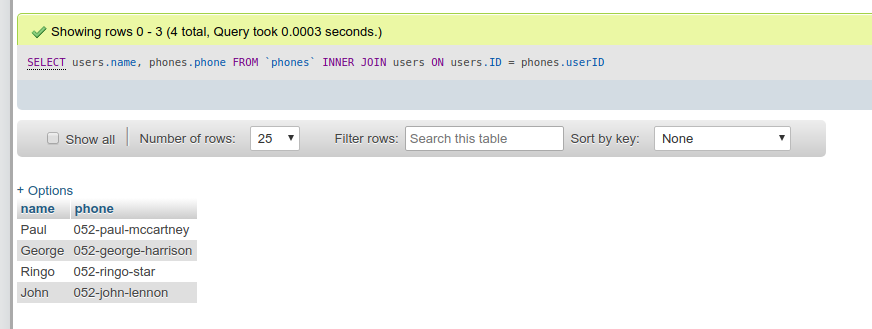
sql joins


Inner join:

SELECT users.name, phones.phone FROM `phones` INNER JOIN users ON users.ID = phones.userID


Left join:

SELECT users.name, phones.phone FROM `users` LEFT JOIN `phones` ON users.ID = phones.userID


Right join:

SELECT users.name, phones.phone FROM users RIGHT JOIN phones ON users.ID = phones.userID


Tuesday, September 3, 2019

Creating local virtual directory


#Create soft link:
ln -s /path/to/real/folder /path/to/symbolic/link

# Example:
ln -s /path/to/real/folder /var/www/html/symbolic_link
------------------------------------------------------------------------------------------------

#add virtual domain to yor local machine (hosts file)

sudo nano /etc/hosts
------------------------------------------------------------------------------------------------
# add to follow line and save the file:

127.0.0.1 the-domain-that-you-want-to-add.com

------------------------------------------------------------------------------------------------
#configure your apache to work with the new configured domain in the hosts file

sudo nano /etc/apache2/sites-available/000-default.conf
------------------------------------------------------------------------------------------------
#add the following configuration
<VirtualHost *:80>

    ServerAdmin your@email.com

    ServerName the-domain-that-you-want-to-add.com

    ServerAlias www.the-domain-that-you-want-to-add.com

    DocumentRoot /var/www/html/symbolic_link

    ErrorLog ${APACHE_LOG_DIR}/error.log

    CustomLog ${APACHE_LOG_DIR}/access.log combined

                <Directory /var/www/html/symbolic_link>

                                Options Indexes FollowSymLinks MultiViews

                                AllowOverride All

                                Order allow,deny

                                allow from all

                </Directory>

</VirtualHost>

------------------------------------------------------------------------------------------------

that's it
Now open your browser and navigate to http://the-domain-that-you-want-to-add.com

Saturday, July 8, 2017

JS Inheritance OOP


See the Pen JS Inheritance OOP by Ariel Barkan (@ArielBarkan) on CodePen.

Creating Array of Objects + search


Tuesday, January 17, 2017

Thursday, June 2, 2016

Linux mint: can't access a shared partition created by the Windows partition


How yo fix it:
Type in your terminal: : sudo ntfsfix /dev/sda7


Error mounting /dev/sda7 at /media/ariel/shared: Command-line `mount -t "ntfs" -o "uhelper=udisks2,nodev,nosuid,uid=1000,gid=1000,dmask=0077,fmask=0177" "/dev/sda5" "/media/ariel/shared"' exited with non-zero exit status 14: The disk contains an unclean file system (0, 0).
Metadata kept in Windows cache, refused to mount.
Failed to mount '/dev/sda7': Operation not permitted
The NTFS partition is in an unsafe state. Please resume and shutdown
Windows fully (no hibernation or fast restarting), or mount the volume
read-only with the 'ro' mount option.


This is the error message:


This is the solution:

Thursday, December 3, 2015

Upgrading from Linux Mint 17.2 “Rafaela” to Linux Mint 17.3 “Rosa”


ORIGIN : http://sourcedigit.com/17812-linux-mint-17-3-rosa-download-upgrade/
linux-mint-17-3-rosa
First of all, run the following commands to update the system to the current stable state:

$ sudo apt update
$ sudo apt upgrade
$ sudo reboot

After updating the system, we need to update the distribution code (change the name of the official repositories for Rosa packages). Run the following commands to do so:

$ sudo sed -i 's/rafaela/rosa/' /etc/apt/sources.list
$ sudo sed -i 's/rafaela/rosa/' /etc/apt/sources.list.d/official-package-repositories.list

Finally, run the commands to update the system files and the distribution package:

$ sudo apt update
$ sudo apt upgrade
$ sudo apt dist-upgrade

Once the system-update process is complete, restart the system – manually or use the command “sudo reboot” (without quotes).

Monday, November 9, 2015

Running Fiddler on Linux

http://blog.michaelhidalgo.info/2015/06/fiddler-up-and-running-on-linux-mint.html?m=1

Sunday, August 2, 2015

Getting the windows serial number from the BIOS while running Linux mint*


Copy & paste (ctrl+shift+V) into your terminal window

sudo hd /sys/firmware/acpi/tables/MSDM 


*Might work on other Linux distributions.

Monday, May 25, 2015

PHP mail() function enable on DigitalOcean.com


log has root or use sudo apt-get install php-pear 
pear install mail 
pear install Net_SMTP 
pear install Auth_SASL 
pear install mail_mime 
apt-get install postfix 
vi /etc/php5/apache2/php.ini (set sendmail path to /usr/sbin/sendmail -t -i)
Reboot apache gracefully apachectl graceful

Thanks to info, original answer at https://www.digitalocean.com/community/questions/php-mail-function-enable

Friday, May 30, 2014

Clear sound on electric guitar amplifier fender mustang 1 v2


After few weeks that I tried to set my guitar amplifier  fender mustang 1 v2 to produce "crystal clear" sound + two days of thoughts about selling the amp and buy a "better one", I finally found the way to get clear sound.

  1. Turn off the amplifier
  2. Press the "TAP" button.
  3. Turn on the amplifier while the "TAP" button is pressed.
  4. That's it!
    •  No effects, no gain, no reverb, no cool effects. JUST CLEAR SOUND.


Tuesday, April 22, 2014

How to make a bootable Mavericks install drive (usb, disk on key)

The text below is "copy paste" from liondiskmaker site. version 3 supports the Mavericks installer

Link: http://liondiskmaker.com/ 

DiskMaker X (formerly Lion DiskMaker) is an application built with AppleScript that you can use with Mac OS X 10.6, 10.7, OS X 10.8 and 10.9 to build a bootable drive from Mac OS X Lion, OS X Mountain Lion Installation or OS X Mavericks Installer program. As soon as you launch the application, it tries to find the OS X Install program with Spotlight. Then, it proposes to build a bootable install disk and make it look as nice as possible. It’s the easiest way to build an OS X Installer in a few clicks !


linux bulk prefix filenames

  In order to bulk add prefix to filenames  in a directory run the following comnmand for f in * ; do mv -- "$f" "2018-05-24_...